
Last month you spent $72 on food delivery without noticing — three orders, a few dollars in fees each time, easy to miss in a wall of transactions.
Here’s the answer-first version: paste last month’s bank transactions into Claude, and in about 60 seconds you get a full spending breakdown plus two specific savings tips. No spreadsheet, no budgeting app, no math.
Sound familiar?
You open your banking app, scroll through a wall of transactions, and your eyes glaze over. Dozens of small charges, a few big ones, no obvious pattern.
You feel like you’re overspending somewhere. You just can’t see where.
So you close the app and do nothing — until next month, when it happens again.
The 60-second fix
Step 1: Export or copy your transactions
Open your bank or credit card app and find last month’s transaction list. Most apps let you export a CSV — or you can just copy the list (date, description, amount) straight off the screen.
Step 2: Paste it into Claude with this prompt
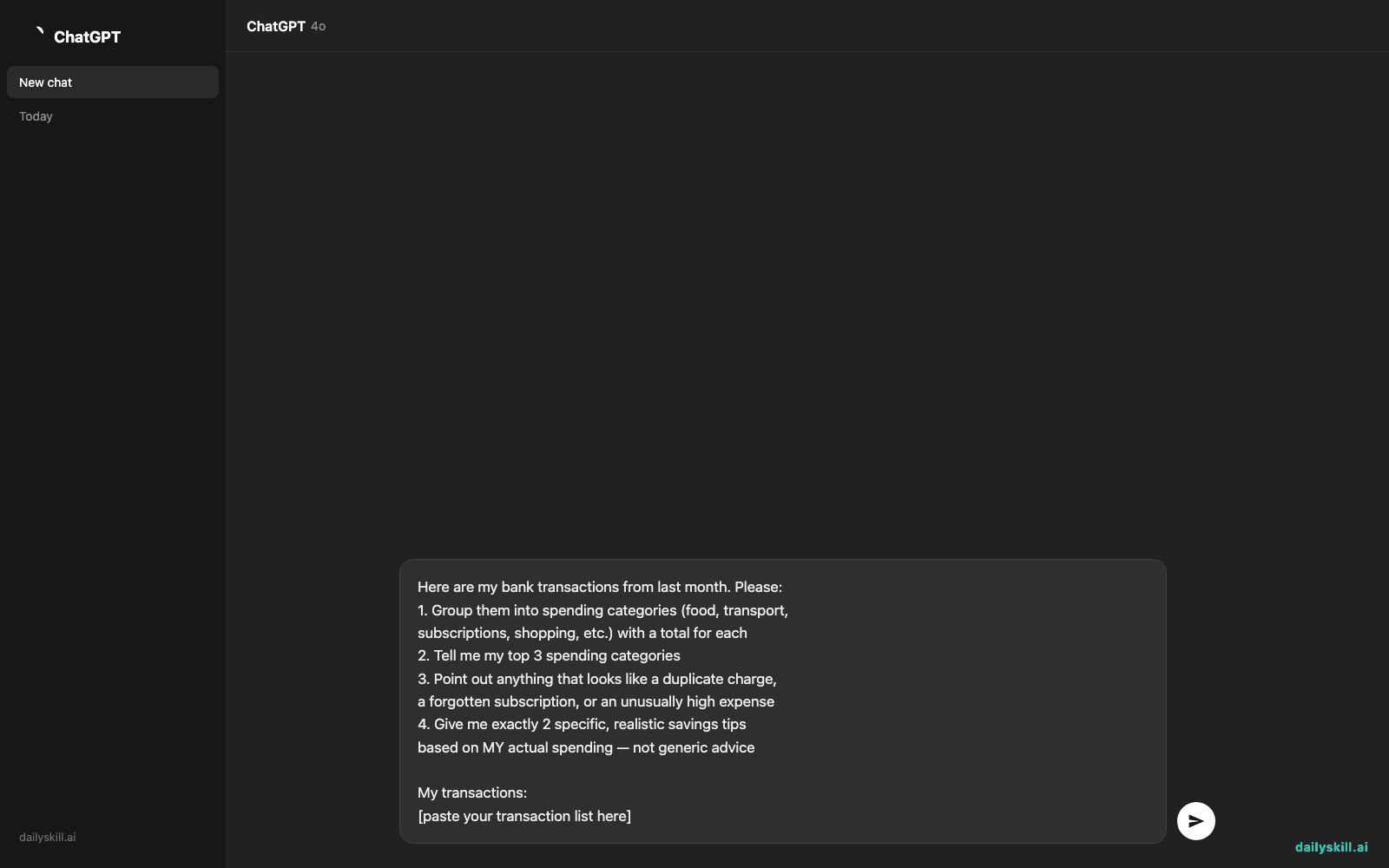
Open a new Claude chat and paste your transactions after this prompt:
Here are my bank transactions from last month. Please:
1. Group them into spending categories (food, transport,
   subscriptions, shopping, etc.) with a total for each
2. Tell me my top 3 spending categories
3. Point out anything that looks like a duplicate charge,
   a forgotten subscription, or an unusually high expense
4. Give me exactly 2 specific, realistic savings tips
   based on MY actual spending — not generic advice

My transactions:
[paste your transaction list here]
Step 3: Read the breakdown and pick one tip to act on
Don’t try to fix everything at once. Just choose one savings tip from the two Claude gives you and act on it this week — cancel the subscription, switch the delivery habit, whatever it is.
The goal isn’t a perfect budget. It’s one small, real change you’ll actually keep.
Real example
Input (a few sample lines pasted in):
09/02  STARBUCKS #4521        -$6.75
09/03  NETFLIX.COM            -$15.99
09/03  SHELL OIL              -$42.10
09/05  DOORDASH*MCDONALDS     -$28.40
09/07  SPOTIFY PREMIUM        -$11.99
09/09  DOORDASH*CHIPOTLE      -$19.85
09/12  AUDIBLE MEMBERSHIP     -$14.95
09/14  STARBUCKS #4521        -$5.50
09/18  DOORDASH*PANDA EXPRESS -$24.10
Claude’s output:
Spending breakdown:
– Food delivery (DoorDash): $72.35 — your #1 category
– Coffee (Starbucks): $12.25
– Subscriptions (Netflix, Spotify, Audible): $42.93
– Gas: $42.10What stood out: You have 3 overlapping entertainment/audio subscriptions (Netflix, Spotify, Audible) totaling ~$43/month — worth checking if you use all three.
2 savings tips:
1. You ordered DoorDash 3 times this month at ~$24 average, including a $5-7 delivery fee each time. Picking up 2 of those 3 orders yourself saves roughly $15-18/month.
2. If you’re not actively listening to Audible books weekly, pausing it saves $14.95/month — you can always resubscribe.
That’s a real spending pattern pulled straight from 9 lines of transaction text — not a guess, not a generic tip list.
Level up
- Compare two months side by side — paste both months and ask Claude to highlight what changed and why.
- Set a target: “I want to cut $100 from this list — show me the easiest cuts first” turns this into an AI financial review with a goal.
- Spot subscription creep: ask Claude to list every recurring charge it can find, so nothing quietly renews unnoticed.
FAQ
Is it safe to paste my bank transactions into Claude?
Use your judgment — it’s fine to paste transaction descriptions and amounts, but you don’t need to include full account numbers, your name, or other personal identifiers. Just the date, merchant, and amount is enough for a solid analysis.
Do I need budgeting software for this to work?
No. This works with anything you can copy as text — a bank app screen, a CSV export, even a photo of a printed statement transcribed by hand.
What if my transactions aren’t neatly formatted?
Doesn’t matter. Claude can handle messy, inconsistent formatting — just paste what you have and ask it to organize it.
Today’s check-in
Try it with your own last month’s transactions and reply in the community with one savings tip Claude gave you — bonus points if it’s a tip you didn’t expect.
Tomorrow: Day 117 — how to turn book chapters into organized, flashcard-ready notes with AI.
You might also like:
Master Everyday AI in 1 Minute a Day
Get our free 2026 Double-Blind AI Benchmark Scorecard & 20 Ready-to-Use Prompts, plus one honest, 60-second AI skill in your inbox every morning. Zero hype, plain English, cancel anytime.


