You’ve got three places you want to see and one free Saturday. What if the order you visit them could save you an hour of driving?
Give Gemini your starting point and three sights. In about a minute, you get a day trip itinerary in the smartest order, with drive times, a lunch break, and a home-by time. No backtracking.
Sound familiar?
You pick three places. You drop them into a map in the order you thought of them. Then you notice stops one and three are right next to each other, and stop two is 40 minutes the other way.
Now your fun day is mostly sitting in the car. You also forgot lunch, and the last stop closes at 5.
The right order is the difference between a relaxed day and a rushed one. Gemini can work that order out for you.
The 60-second fix
1. Gather your three stops
Pick a destination area and three places you’d like to see. Add where you’re starting from and roughly when you want to leave.
2. Copy and paste this prompt
Open Gemini and paste this in. Swap the brackets for your own details.
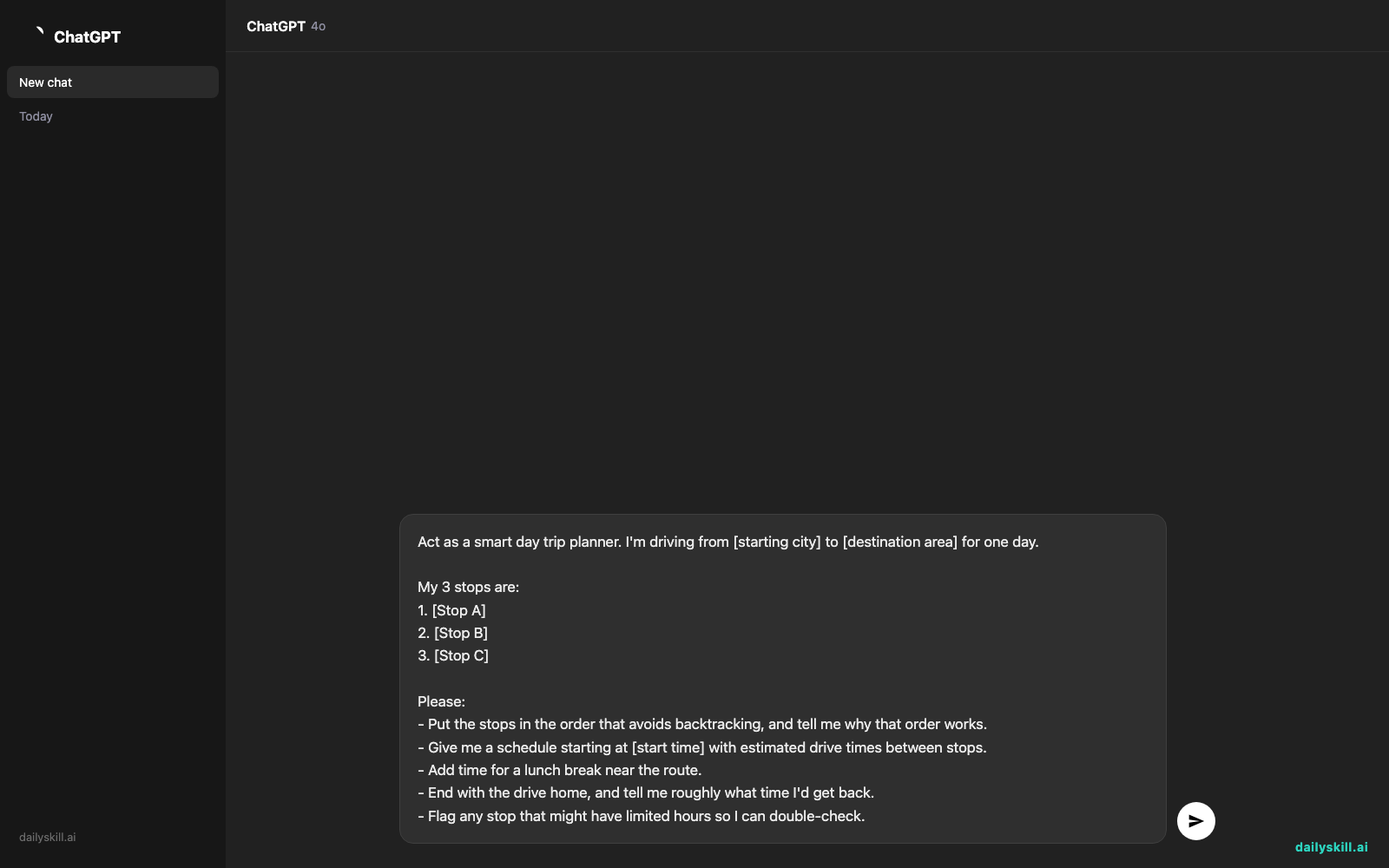
Act as a smart day trip planner. I'm driving from [starting city] to [destination area] for one day.

My 3 stops are:
1. [Stop A]
2. [Stop B]
3. [Stop C]

Please:
- Put the stops in the order that avoids backtracking, and tell me why that order works.
- Give me a schedule starting at [start time] with estimated drive times between stops.
- Add time for a lunch break near the route.
- End with the drive home, and tell me roughly what time I'd get back.
- Flag any stop that might have limited hours so I can double-check.
3. Check it on your map
Gemini gives you the order and the schedule. Spend one minute checking the drive times in your map app. Then confirm opening hours on each place’s website.
The plan is a great starting point. A quick check keeps your day smooth.
Real example
What you typed:
I’m driving from Portland, Oregon to the Columbia River Gorge for one day. My 3 stops are: Multnomah Falls, Cascade Locks, and Vista House at Crown Point. Leave at 8:30 AM.
What Gemini might give you:
Best order: Vista House → Multnomah Falls → Cascade Locks. This follows the Historic Columbia River Highway eastward, so you never turn around. It’s a scenic drive from start to finish.
- 8:30 AM Leave Portland
- 9:15 AM Vista House at Crown Point. Great views, and it’s quieter early. Stay about 45 minutes.
- 10:15 AM Drive to Multnomah Falls (about 20 minutes)
- 10:35 AM Multnomah Falls. Walk up to the bridge and grab a coffee. Stay about 1.5 hours.
- 12:15 PM Drive to Cascade Locks (about 25 minutes)
- 12:45 PM Lunch by the river, then stroll the waterfront
- 2:30 PM Start the drive home on the interstate. Back in Portland around 3:30 PM.
- Heads up: Check Vista House hours before you go. Some seasons it closes earlier.
Notice what happened. Your stops now sit in a line, so every mile takes you somewhere new.
Gemini also flipped your list. Cascade Locks came second in your message, but it landed last. That’s the point.
Level up
- Add your style: Tell Gemini “I have a toddler and need a stop every 90 minutes” or “I want the most scenic roads, even if it adds 15 minutes.”
- Build in a backup: Ask, “Give me one indoor alternative near each stop in case it rains.”
- Make it a loop: Ask for a different road home, so the drive back feels like a new trip too.
FAQ
Can AI really plan a route without backtracking?
Yes. Gemini is good at sorting stops into a logical sequence by location. For exact drive times and live traffic, confirm the final route in your map app before you leave.
How do I make a day trip itinerary realistic?
Tell the AI your start time, how long you like to stay at each stop, and when you want to eat. Then ask it to add buffer time between stops. Realistic plans always include breaks.
What if I have more than three stops?
Start with three. Once that works, add a fourth or fifth and ask Gemini to re-order everything. Three is the sweet spot for a relaxed single day.
Today’s check-in
Plan one day trip with Gemini today. A pretend trip to a place you dream of visiting counts. Then tell us in the comments: which three stops did you pick, and did Gemini reorder them?
Tomorrow (Day 145): Got an email dripping with passive-aggressive vibes? We’ll use AI to turn your reply into a firm, friendly message.
You might also like:
- How do I use AI to compare terms between two lease agreements?
- Magic Eraser (Google Photos) — Erase Unwanted Objects From Any Photo in One Tap
Master Everyday AI in 1 Minute a Day
Get our free 2026 Double-Blind AI Benchmark Scorecard & 20 Ready-to-Use Prompts, plus one honest, 60-second AI skill in your inbox every morning. Zero hype, plain English, cancel anytime.