
Somewhere in your inbox is an email where your boss, a client, or your past self explained exactly how to fix a problem you’re facing again right now. You just can’t find it.
Here’s the fix: paste a handful of old emails into ChatGPT, and in about 60 seconds you’ll get a clean, numbered list of the lessons buried inside them — the kind of list you can actually search next time, instead of scrolling through months of threads.
Sound familiar?
You’ve got years of emails full of hard-won lessons. “Here’s why that vendor didn’t work out.” “Next time, send the invoice before Friday.” “This is how we calmed down that angry customer.”
But nobody re-reads old emails for wisdom. So the lessons stay buried, and the same mistakes happen again.
The 60-second fix
Step 1: Grab 3-5 relevant emails
Pick emails around one theme — a project, a client, a recurring task. Copy the full text of each one, subject line included.
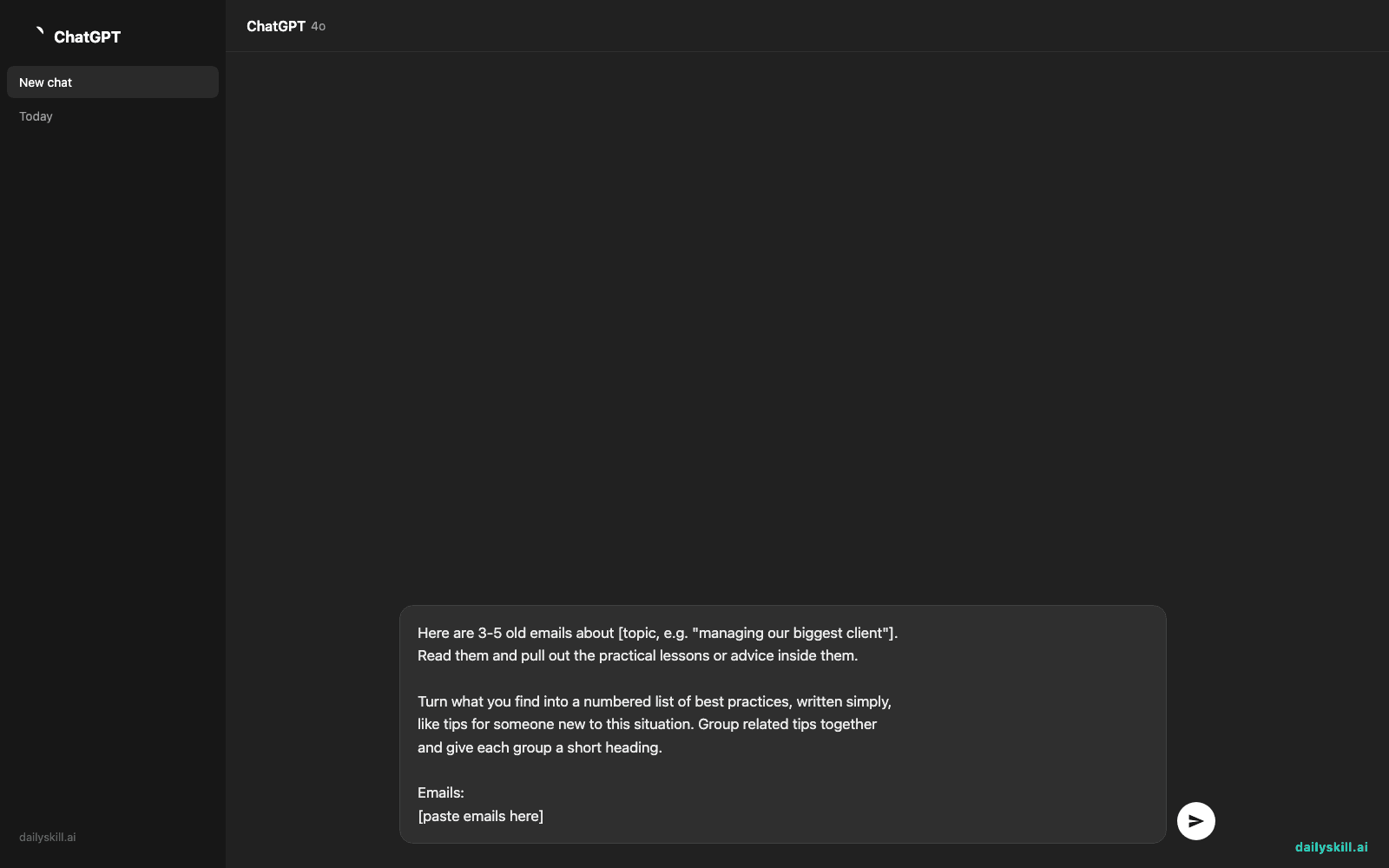
Step 2: Paste them into ChatGPT with this prompt
Here are 3-5 old emails about [topic, e.g. "managing our biggest client"].
Read them and pull out the practical lessons or advice inside them.

Turn what you find into a numbered list of best practices, written simply,
like tips for someone new to this situation. Group related tips together
and give each group a short heading.

Emails:
[paste emails here]
Step 3: Save the output somewhere searchable
Drop the list into a doc, note, or team wiki titled something like “Client X — Lessons Learned.” Now it’s a knowledge base you can search instead of an inbox you have to scroll.
Real example
Input: Three real emails about a delayed website redesign with a contractor — one from you venting about a missed deadline, one where a teammate shared a fix that worked, one with the client’s feedback afterward.
AI output:
Setting Expectations Early
1. Confirm deadlines in writing before work starts — this project had a verbal deadline that got “forgotten” twice.
2. Build in a 3-day buffer for contractor deliverables; it prevented a last-minute scramble on the homepage redesign.Communication During Delays
3. Send a status update the moment you sense a delay — the client said in her email she’d have been fine with a heads-up, but felt blindsided by silence.
4. Offer two solutions, not just an apology, when flagging a problem — that’s what turned the client’s tone around in the third email.
That’s a real, usable checklist, pulled straight out of three messy email threads you’d never have reread otherwise.
Level up
- Build a team playbook: Run this once a month on your team’s shared inbox to build an ongoing set of team best practices everyone can reference.
- Turn tips into onboarding docs: Ask ChatGPT to “format this as a one-page onboarding guide” so new hires can read it on day one.
- Sort by theme: Run it separately for client emails, vendor emails, and internal emails so you end up with organized lists instead of one giant one.
FAQ
Do I need special software to do this?
No. Just copy-paste email text into ChatGPT — no plugins or integrations needed.
Will this work with really old or messy emails?
Yes. AI is good at finding the useful bits even in rambling or informal emails — it just needs the text.
Is my email content private if I paste it in?
Treat it like any shared document. Avoid pasting sensitive personal data like passwords or account numbers, and check your AI tool’s privacy settings if you’re unsure how your inputs are stored or used.
Today’s check-in
Try it with one old email thread today and reply with the best lesson it pulled out — we’ll feature our favorites. Tomorrow: we’re decoding those confusing nutrition labels into plain English, in under a minute.
You might also like:
- How do I use AI to quickly summarize a long document or article?
- Synthesia — Turn Text Into a Video With a Real-Looking Presenter
Master Everyday AI in 1 Minute a Day
Get our free 2026 Double-Blind AI Benchmark Scorecard & 20 Ready-to-Use Prompts, plus one honest, 60-second AI skill in your inbox every morning. Zero hype, plain English, cancel anytime.