
One missed 60-day notice can lock you into another full year of a contract you meant to cancel. Here’s exactly how to make sure that never happens to you.
In about a minute, you’ll paste a contract into Claude and get back a dated list of every deadline and required notice. Each row says what to do, by when, and what happens if you don’t. Then you drop the key dates into your calendar.
Sound familiar?
You’ve got a lease, a freelance agreement, a software subscription, or a vendor contract. It’s eleven pages long. The deadlines are buried in lines like “Section 8.3(b), subject to Section 12.1.”
So you skim it, sign it, and promise yourself you’ll “remember the important dates.”
Then an auto-renewal quietly kicks in, or a notice window slips by. Nobody warns you. The contract did, on page nine.
You don’t need to reread every line. You just need the dates pulled out and put in order.
The 60-second fix
1. Copy the contract text
Open your contract and copy the section you need, or the whole thing if it’s short. If you have a PDF, you can also upload the file instead of pasting. Renewal, term, payment, and termination sections hold most of the deadlines.
Before you share it, remove anything private, like account numbers or personal details. If the contract is confidential, check your company’s rules first.
2. Paste it into Claude with this prompt
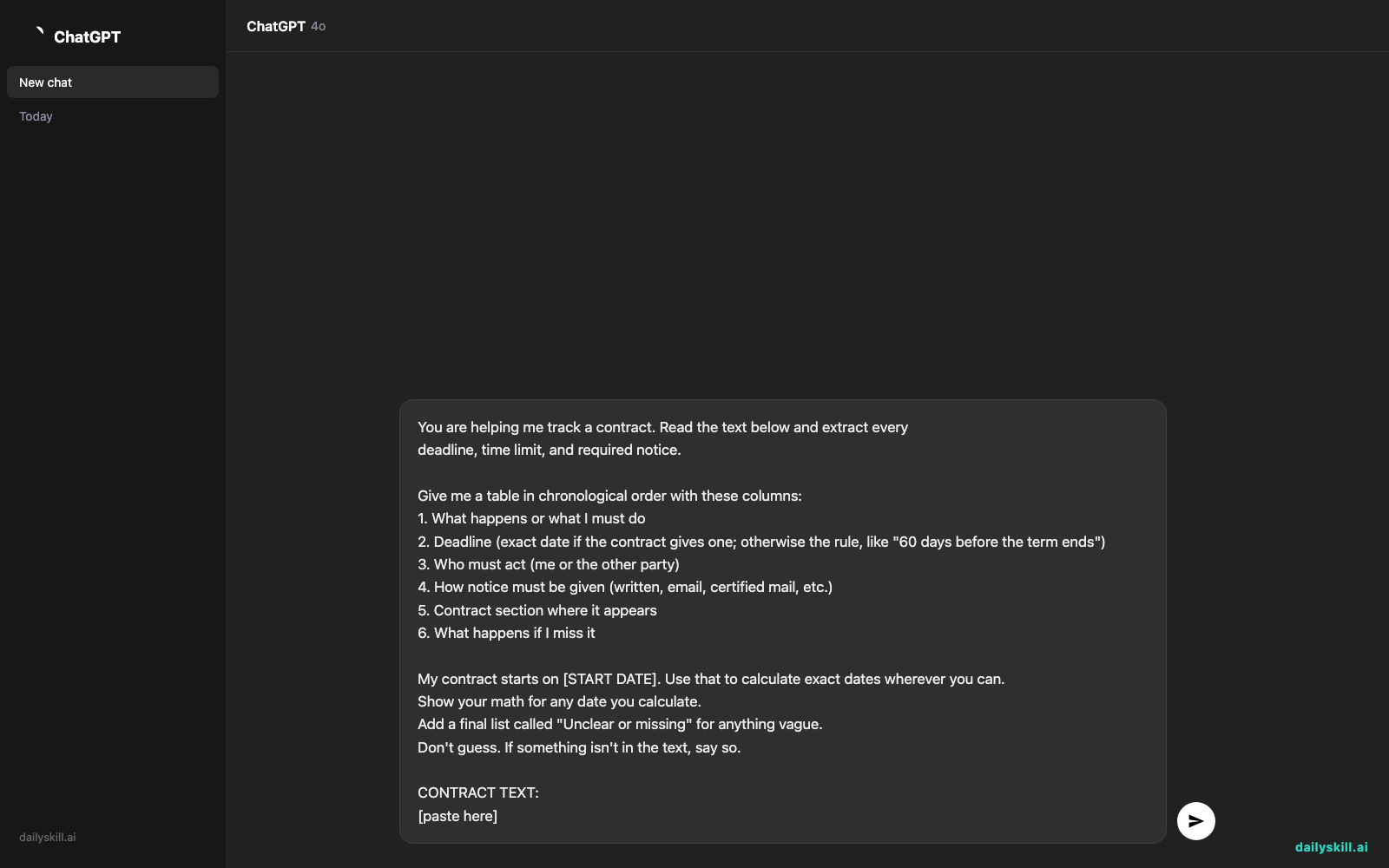
Open Claude, paste the prompt below, then paste your contract text underneath it. Swap in your real start date where it says [START DATE].
You are helping me track a contract. Read the text below and extract every
deadline, time limit, and required notice.

Give me a table in chronological order with these columns:
1. What happens or what I must do
2. Deadline (exact date if the contract gives one; otherwise the rule, like "60 days before the term ends")
3. Who must act (me or the other party)
4. How notice must be given (written, email, certified mail, etc.)
5. Contract section where it appears
6. What happens if I miss it

My contract starts on [START DATE]. Use that to calculate exact dates wherever you can.
Show your math for any date you calculate.
Add a final list called "Unclear or missing" for anything vague.
Don't guess. If something isn't in the text, say so.

CONTRACT TEXT:
[paste here]
3. Check it, then add it to your calendar
Skim the table against your contract. For the dates that matter most, ask Claude to double-check its math.
Then copy the key dates into your phone or calendar. Set a reminder 2 weeks ahead of each one.
Tip: Let Claude do the reminder math too. Add this line: “For each notice deadline, also give me a reminder date 14 days earlier.”
Real example
What you paste in (shortened):
Effective Date: January 15, 2027.
2. Term. Initial term is twelve (12) months and renews automatically for
successive one-year terms unless either party gives written notice of
non-renewal at least sixty (60) days before the end of the then-current term.
3. Fees. Provider may change fees upon ninety (90) days' written notice
before renewal. Invoices are due net thirty (30) days.
4. Insurance. Customer shall deliver a certificate of insurance within
ten (10) days of the Effective Date.
9. Termination. Either party may terminate for uncured breach after
fifteen (15) days' written notice.
What Claude gives you:
Deadline What Who Notice Section If missed Jan 25, 2027 Send certificate of insurance (Jan 15 + 10 days) You Not specified 4 Possible breach Oct 16, 2027 Last day the provider can announce fee changes (90 days before term ends Jan 14, 2028) Provider Written 3 Fee change may not apply Nov 15, 2027 Last day to give non-renewal notice (60 days before Jan 14, 2028) You Written 2 Contract renews for another year 30 days after each invoice Payment due You Not specified 3 Possible late-payment issues 15 days after a breach notice Window to fix a breach Either party Written 9 Contract can be terminated Unclear or missing: The contract doesn’t say how “written notice” must be delivered. Ask the other party to confirm that email counts.
Look at the Nov 15 row. Without it, you’d have found out in January that you owed another year.
Also read the “Unclear or missing” list. That’s often where the real surprises hide.
Level up
- Turn it into calendar entries. Ask: “Convert this table into a list I can paste into my calendar, one line per reminder.”
- Find the traps. Ask: “Which of these deadlines would cost me money or lock me in if I missed them? Rank them.”
- Compare two contracts. Paste both and ask for one combined timeline, so overlapping renewals don’t catch you off guard.
FAQ
Can AI really find the deadlines in a contract?
Yes. AI is good at spotting time limits and notice rules, even when they’re scattered across sections. Ask it to cite the section for each one, so you can verify it yourself in seconds.
Can I trust the dates it calculates?
Treat them as a strong first draft. Ask Claude to show its math, then confirm the important dates against the contract.
For high-stakes deals, have a lawyer review it. This is a time-saver, not legal advice.
What’s the best way to build a contract renewal tracker?
Run the prompt once on each contract. Then copy the renewal and notice dates into one calendar or spreadsheet.
Set reminders at least 2 weeks before each notice date, since that’s when you can still act.
Today’s check-in
Pick one contract you’ve already signed, like a lease, a gym membership, or a software plan. Run the prompt on its renewal and termination section.
Then tell us in the comments: what was the earliest deadline you found, and did it surprise you?
Tomorrow (Day 148): you’ll learn how to generate 5 high-converting email subject lines from your draft email body, with AI.
You might also like:
- How do I use AI to build a simple weekly budget without complicated apps?
- Julius AI — Turn a Messy Spreadsheet Into Charts by Just Asking
Master Everyday AI in 1 Minute a Day
Get our free 2026 Double-Blind AI Benchmark Scorecard & 20 Ready-to-Use Prompts, plus one honest, 60-second AI skill in your inbox every morning. Zero hype, plain English, cancel anytime.


