
Ever stared at two spreadsheets and thought, “Why can’t I just tell it to pull the price over?”
You can. Describe your two sheets in plain words, and ChatGPT gives you a working XLOOKUP or INDEX/MATCH formula in about a minute. You paste it in, and the prices fill themselves. No syntax to memorize, no tutorial rabbit hole.
Sound familiar?
You have a list of orders on one sheet and a list of prices on another. You want each price to show up next to its order automatically.
So you search online and land on a forum thread from 2014. You hit words like “lookup_array” and “match_type,” your eyes glaze over, and you end up typing 200 prices by hand.
There’s a better way. You already know what you want. AI can handle the how.
The 60-second fix
1. Know your two sheets
Write down three things in plain words:
- What’s in Sheet 1 (the one getting the new information)
- What’s in Sheet 2 (where the information lives)
- The matching key: the thing that appears in both, like a product code or an email address
2. Paste this prompt into ChatGPT
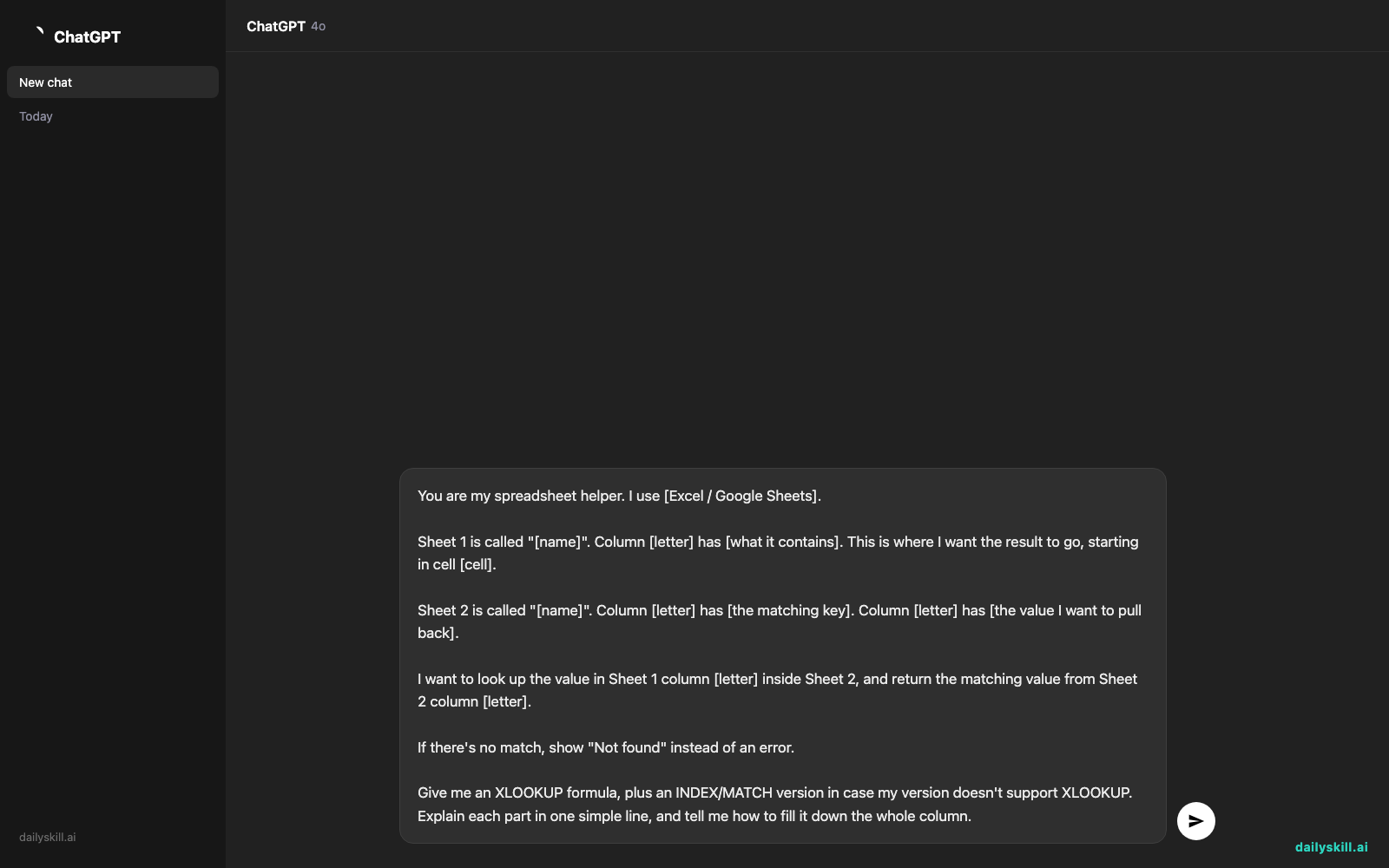
You are my spreadsheet helper. I use [Excel / Google Sheets].

Sheet 1 is called "[name]". Column [letter] has [what it contains]. This is where I want the result to go, starting in cell [cell].

Sheet 2 is called "[name]". Column [letter] has [the matching key]. Column [letter] has [the value I want to pull back].

I want to look up the value in Sheet 1 column [letter] inside Sheet 2, and return the matching value from Sheet 2 column [letter].

If there's no match, show "Not found" instead of an error.

Give me an XLOOKUP formula, plus an INDEX/MATCH version in case my version doesn't support XLOOKUP. Explain each part in one simple line, and tell me how to fill it down the whole column.
3. Paste the formula and test it
Copy the formula into your first cell. Check one or two rows by eye to make sure the answer is right. Then fill it down.
Got an error? Copy the error message back into ChatGPT and say, “I got this. Can you fix it?” That’s it.
Real example
Say you run a small candle shop. Your “Orders” sheet lists product codes in column A, and you want the price in column C. Your “Prices” sheet has codes in column A and unit prices in column B. Here’s the filled-in prompt:
I use Google Sheets.

Sheet 1 is called "Orders". Column A has product codes like CND-101 and CND-204. I want the price to go in column C, starting in C2.

Sheet 2 is called "Prices". Column A has product codes. Column B has the unit price, like 14.50.

Look up each code in Orders column A inside Prices column A, and return the matching price from Prices column B. If there's no match, show "Not found".

Give me an XLOOKUP formula and an INDEX/MATCH version. Explain each part simply, and tell me how to fill it down.
ChatGPT might reply with something like:
XLOOKUP:
=XLOOKUP(A2, Prices!A:A, Prices!B:B, "Not found")
Look for A2 in the Prices codes, return the price next to it, and say “Not found” if it’s missing.INDEX/MATCH:
=IFERROR(INDEX(Prices!B:B, MATCH(A2, Prices!A:A, 0)), "Not found")
MATCH finds the row number of the code. INDEX grabs the price from that row. IFERROR swaps any error for “Not found”.To fill down: Click C2, then double-click the small square in the cell’s bottom-right corner.
Paste it into C2 and the order for CND-101 shows 14.50 right away. Fill down, and the whole column is done.
Level up
- Match on two things at once. Say, “Match on both product code AND size,” and ask for a formula that handles it.
- Look left. Need a value from a column before your key? Say so. Both XLOOKUP and INDEX/MATCH can do it.
- Ask for a plain-English check. Paste any formula back and say, “Explain what this does like I’m new to spreadsheets.” It’s a painless way to learn as you go.
FAQ
Can ChatGPT write Excel and Google Sheets formulas?
Yes. Just tell it which program you use. Most formulas work in both, and it will usually point out the ones that don’t.
What’s the difference between XLOOKUP and INDEX/MATCH?
Both find a match in one list and return a related value. XLOOKUP is shorter and easier to read.
INDEX/MATCH also works in older versions of Excel. If you’re not sure which one you have, ask for both, like the prompt above does.
What if the formula gives me an error?
Copy the exact error message and your formula back to ChatGPT. Add a few sample rows from each sheet if you can.
A common culprit is a hidden space or a number stored as text. Pointing it at your sample rows usually helps it spot the problem.
Today’s check-in
Pick one lookup you’ve been doing by hand, even a tiny one. Run the prompt above and see if the formula works on the first try.
Then tell us in the comments: what did you ask your spreadsheet to do?
Tomorrow (Day 147): Got a long contract or terms sheet you dread reading? We’ll use AI to pull out every actionable deadline in one pass.
You might also like:
- How do I use AI to build a simple weekly budget without complicated apps?
- Julius AI — Turn a Messy Spreadsheet Into Charts by Just Asking
Master Everyday AI in 1 Minute a Day
Get our free 2026 Double-Blind AI Benchmark Scorecard & 20 Ready-to-Use Prompts, plus one honest, 60-second AI skill in your inbox every morning. Zero hype, plain English, cancel anytime.


