
You took a great photo. Then you spent 15 minutes staring at a blank caption box.
Here’s exactly how to turn one image into five ready-to-post captions — in under a minute, using an AI caption generator.
Sound Familiar?
The photo is good. The moment was real. But now you’re stuck choosing between “vibes ✨” and nothing at all. You post late, or not at all, because writing the words is somehow harder than taking the picture.
This is the fix.
The 60-Second Fix
Step 1 — Open Gemini or ChatGPT
Both tools let you upload a photo directly in the chat window. Tap the image icon (📎 or 🖼️) and select your photo.
Step 2 — Paste this prompt
Look at this photo and write 5 different Instagram captions for it.
Make them varied: one funny, one heartfelt, one short and punchy,
one question to spark comments, and one inspirational.
Then add 10 relevant hashtags at the end of each caption.
Step 3 — Pick, tweak, post
Skim the five options. One will feel right immediately. Copy it, make any tiny personal edit, and post. Done.
Real Example
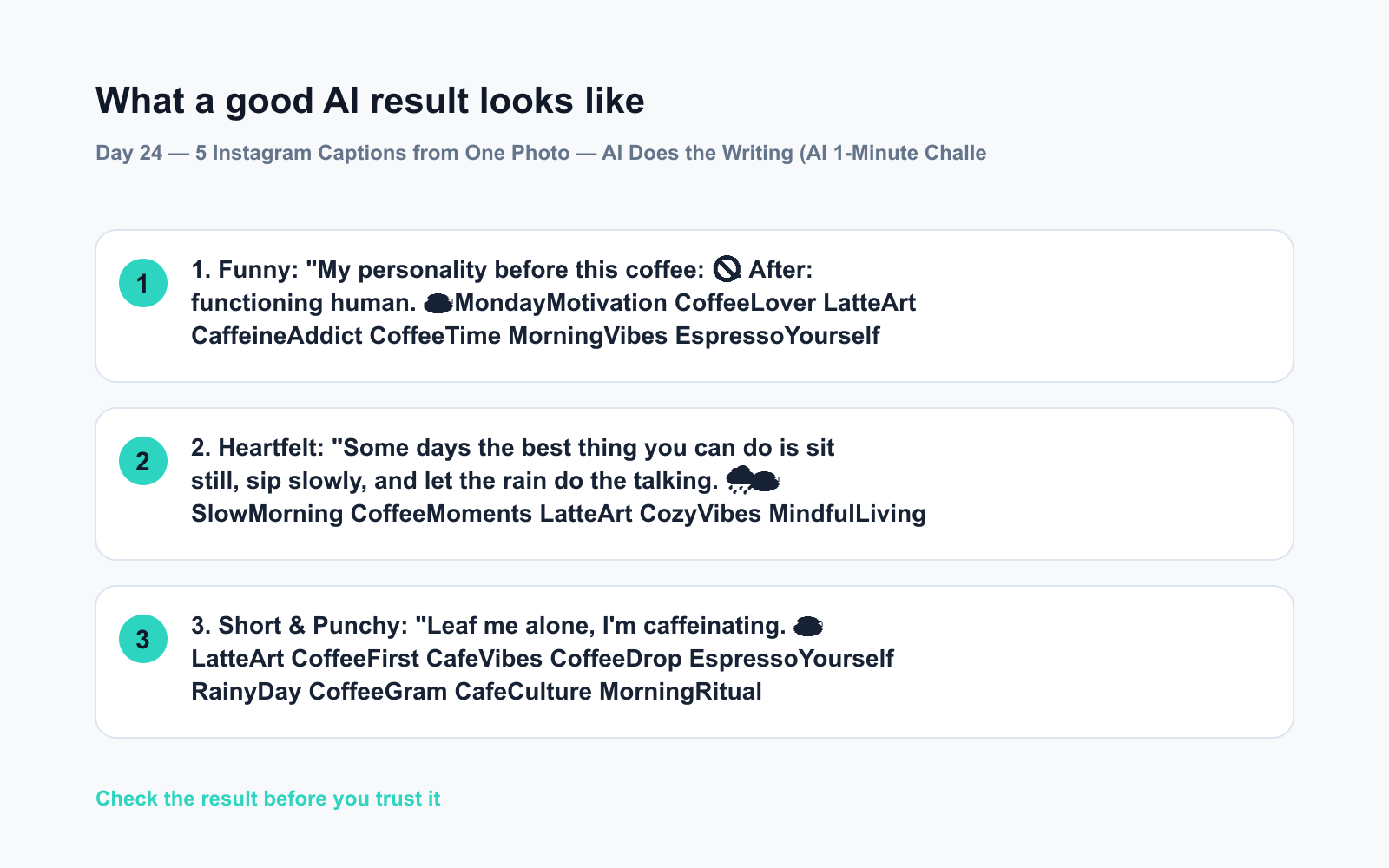
Photo uploaded: A latte with leaf foam art on a rainy café window background.
1. Funny: “My personality before this coffee: 🚫. After: functioning human. ☕ #MondayMotivation #CoffeeLover #LatteArt #CaffeineAddict #CoffeeTime #MorningVibes #EspressoYourself #CoffeeGram #RainyDayVibes #CafeCulture”
2. Heartfelt: “Some days the best thing you can do is sit still, sip slowly, and let the rain do the talking. 🌧️☕ #SlowMorning #CoffeeMoments #LatteArt #CozyVibes #MindfulLiving #QuietMorning #CoffeeAndRain #CaféLife #PresentMoment #SimpleJoys”
3. Short & Punchy: “Leaf me alone, I’m caffeinating. ☕ #LatteArt #CoffeeFirst #CafeVibes #CoffeeDrop #EspressoYourself #RainyDay #CoffeeGram #CafeCulture #MorningRitual #CoffeeObsessed”
4. Question: “Rainy day coffee order — latte or flat white? Tell me below. 👇 #CoffeeDebate #LatteVsFlatWhite #CoffeeLovers #CaféLife #CoffeeTalk #MorningCoffee #RainyVibes #CoffeeGram #CafeCulture #YouChoose”
5. Inspirational: “Even on grey days, there’s something beautiful waiting in the ordinary. ☕🌧️ #FindTheBeauty #CoffeeArt #SlowDown #LatteArt #MorningLight #GratefulHeart #CaféMoment #EverydayMagic #CoffeeAndLife #SimpleThings”
Five completely different tones. Ten hashtags each. All from one photo and one prompt — that’s social media AI doing the heavy lifting.
Level Up
- Target a platform: Add “write these for LinkedIn, not Instagram — keep them professional” and the tone shifts completely.
- Match your brand voice: Add “I’m usually playful and use casual language, no corporate speak” before the prompt. The AI mirrors your style.
- Batch content: Upload three different photos at once and ask for two captions per photo. Ten pieces of content, one session.
FAQ
Can an AI caption generator really write captions from just a photo?
Yes. Tools like Gemini and ChatGPT analyze the image visually and generate contextually relevant text — they’re not guessing, they’re describing what they see and matching it to the tone you request.
Are the hashtag ideas AI suggests actually good?
They’re a solid starting point. AI pulls commonly associated tags for the subject and mood. You may want to swap one or two for niche community tags specific to your account’s focus.
Do I need to edit the captions before posting?
A quick personal touch always helps — drop in a real name, a local reference, or your signature emoji. But many users post the AI draft as-is. It’s your call.
Today’s Check-In 💬
Try it with any photo on your phone right now — even an old one. Drop your favorite of the five captions in the comments. Which tone did AI nail for you?
Tomorrow — Day 25: We’re wrapping up your first 25 days with something special: a complete everyday AI cheat sheet — all 25 tricks, one scannable page you’ll want to bookmark forever.
⭐ Want every prompt in one place?
All 136 tested prompts from our daily skills are free on
GitHub — DailySkill Prompt Library.
Star it to get new prompts as we publish.
More on AI for Everyday Life & Home:
- 5 AI Tasks You Can Do Every Day in Under 90 Seconds Each
- Can AI Help With Meal Planning and Recipes? (Yes, Here’s How)
- Can AI Read and Summarize a Website or Article for Me?
You might also find these helpful:
- Turn Your Messy Voice Memos Into a Clean, Organized Outline
- Rewrite Any Email to Sound More Professional — in 60 Seconds
- How Do I Get AI to Write in My Voice?
Master Everyday AI in 1 Minute a Day
Get our free 2026 Double-Blind AI Benchmark Scorecard & 20 Ready-to-Use Prompts, plus one honest, 60-second AI skill in your inbox every morning. Zero hype, plain English, cancel anytime.


